You have won your first GEO client, or you are about to. Winning the client is step one. The first month decides whether they stay.
That first month decides whether GEO becomes a repeatable service line or a stressful one-off. Set the client up correctly, capture the evidence, decide what to fix, and present a plan, and you end the month with a client who sees the value and a process you can run again. Skip or reorder steps, and you spend the month improvising.
This article is a practical checklist for that first month, run on SixWings. It covers what SixWings is and how it helps, the onboarding sequence from workspace to prompts, the AI visibility run and the analyses that follow, and how to plan with the client and deliver the first month of work. It closes with why the order matters, because the sequence is doing real work, not just keeping things tidy.
Contents
- What SixWings is, and who it is for
- Before you start: what to have ready
- Step 1: Create the client workspace
- Step 2: Fill in the knowledge base
- Step 3: Generate and curate the prompts
- Step 4: Run the AI visibility report
- Step 5: Run the content, site, and source analysis
- Step 6: Plan the first month with the client
- Step 7: Execute the first month of work
- Why the order of steps matters
- Where SixWings fits
- Frequently asked questions
What SixWings is, and who it is for
SixWings pioneered the Answer Experience Design model and built the platform that runs it. In plain terms, it is a fully white-labelled GEO operating system.
It measures how a brand shows up in AI answers, turns that raw data into prioritized recommendations and simple implementation briefs, and hands those to whoever executes, so the work is easy to act on.
It is built for agencies managing GEO, SEO, content, or AI visibility across several client brands. Each client gets its own separate workspace, so one agency can run many clients without mixing their data. That workspace structure is the reason the onboarding below is worth doing carefully: everything you set up for this first client becomes the template for the next.
One practical note before the checklist. The method is already inside the software, which is what lets your existing team deliver GEO without hiring a specialist first. The steps below are the method, laid out in the order the platform expects.
Before you start: what to have ready
A smooth first month depends on a small amount of preparation. Before you open the platform, gather the client's basics: their website, a short description of what they sell, their main markets and languages, their real competitors, and any claims they are careful about making or not making.
You do not need all of this to be perfect on day one. The knowledge base can stay a draft while you complete it. But the more accurate this input is, the more useful everything downstream becomes, because the whole system is grounded in it.
If the client has a brand or messaging document, have it open. Most of what you need for a strong knowledge base is already written down somewhere in their existing materials.
Step 1: Create the client workspace
The first action in the platform is to create a workspace for the client. A workspace is the operating boundary for one brand: all of that client's data, runs, analyses, and reports live inside it and stay scoped to it.
This is also where roles are set. A workspace supports owner, member, and client roles, so you decide who on your team can do what, and what the client themselves can see later through the portal. Setting this up cleanly now saves confusion when the account grows.
Keep the discipline of one workspace per client from the very first one. It is tempting to reuse a space or mix clients early on, but the separation is what lets you scale later without the data becoming a tangle.
Step 2: Fill in the knowledge base
With the workspace created, the next step is the knowledge base. This is the single most important input in the whole process, because everything the platform does downstream is grounded in it.
The knowledge base is the authoritative record of the client's context. It captures their company identity, website, description, markets, and languages. It holds their products and services, their ICPs, the problems their buyers have, and the language their market uses. It records their direct and indirect competitors, and the exact keywords that count as a brand or competitor mention.
It also captures the things that keep the work on-brand: positioning, differentiators, the claims the client stands behind, the claims they must never make, their tone, and their guardrails.
Fill this in as completely as you can. The knowledge base can remain a draft while you work on it, then be submitted so the downstream workflows can use it. Submitting it is what grounds prompt generation, content analysis, and content production in the client's approved context rather than in guesswork.
A word of care here, because this step pays off repeatedly. The competitors and the mention keywords you enter now are what the platform looks for in AI answers later. Thin input produces thin findings. Time spent on the knowledge base is time saved in every step that follows.
Step 3: Generate and curate the prompts
Once the knowledge base is submitted, you generate the prompts. A prompt here is a real question a buyer might ask an AI engine about the client's category.
SixWings generates saved prompt lists from the submitted knowledge base. A generation request takes a named list, an optional brief, and a set of prompts. The questions come back grounded in the client's own context, so they reflect what that brand's buyers actually ask rather than generic category queries.
Generation is the start, not the end. You can then rename lists, and add, remove, reorder, or rewrite the questions. You can also classify each prompt by commercial intent, from top of funnel through to bottom of funnel, so you know which questions sit closest to a buying decision.
This curation step matters more than it looks. The prompts you keep are the questions the whole visibility run is measured against. A few minutes making sure they are the right ones, especially the high-intent comparison and decision questions, shapes how useful the results will be.
One thing to know about how the platform works: generating a prompt list and running it are two separate actions. Creating the list does not automatically run it across the engines. That separation is deliberate, because it lets you get the questions right before you spend a run on them.
Step 4: Run the AI visibility report
Now you run the questions. You select the saved prompt list and run every prompt across the AI providers available to the workspace. The current provider catalog is OpenAI, Anthropic, Google Gemini, Perplexity, and xAI Grok. Because Google's AI Overviews are powered by Gemini, that surface is covered through the Gemini provider.
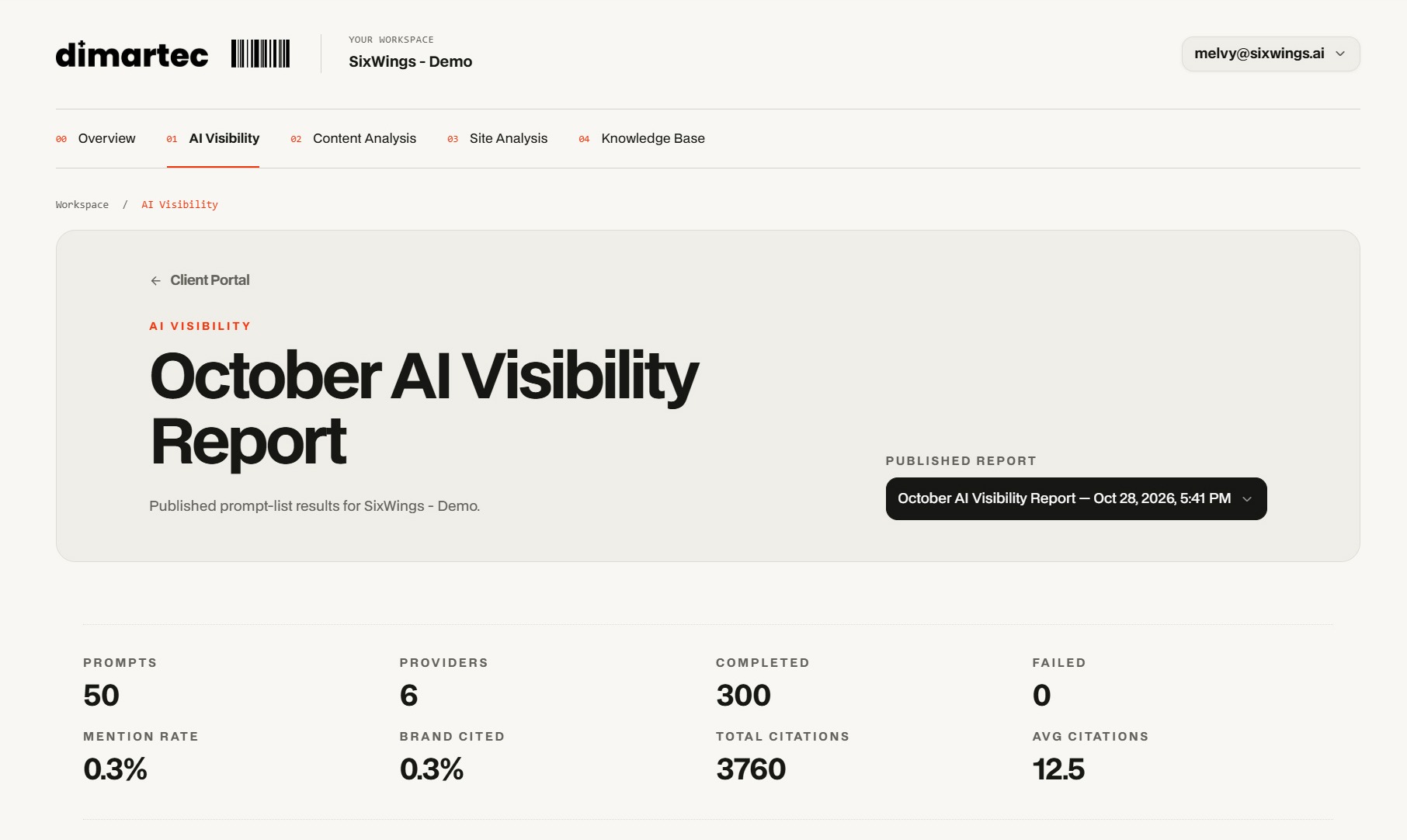
This is the measurement moment, and it is also where SixWings differs from a simple rank tracker. It does not just return a score. It preserves the full evidence behind every answer: the exact question, the provider's response, where the brand and competitors were mentioned, the citations and cited domains, and, where the provider exposes them, the web searches the engine ran and the sources it retrieved.
The completed report gives you real metrics to work with: how often the brand is mentioned, how often it is cited, the total and average citations, and the competitor mention and citation evidence alongside. The visibility score you see is simply the brand's mention rate expressed on a 0 to 100 scale, not a mysterious composite.
Read the results across providers, not as one blended number. A brand can be strong on one engine and weak on another for the very same questions, and that difference is often where the first opportunities are.
A practical note on expectations: runs are started manually, and a run is a point-in-time capture, not a live feed. You decide when to run, and the result is a snapshot you can compare against later.
Step 5: Run the content, site, and source analysis
The visibility run tells you how the brand appears. The next layer tells you why, and that is what turns findings into work you can bill for.
Start with the sources. The visibility run already captured which domains and pages the engines searched and cited. This matters because the pages shaping an answer are usually not the client's own site. Knowing a brand is absent is a finding; knowing which competitor page or directory is being cited instead is the beginning of a fix.
Then run the site analysis. SixWings generates a bounded technical audit from the client's URL, following links across the site and attempting up to 15 pages, prioritizing the important company pages.
It evaluates seven factors, including whether AI crawlers can access the site, whether machine-readable signals exist, whether structured data and metadata are clean, and whether entities and claims are consistent. The result is a scored report with findings and a prioritized roadmap, not just a list of problems.
Then run the content analysis. This evaluates the client's existing pages, individually and as a set, against the submitted knowledge base. It looks at how clearly each page states its claims, how extractable it is for answer engines, and where there are gaps, unsupported claims, or inconsistencies the engines would struggle with.
Together, these three analyses convert the visibility picture into specific, located reasons. You move from "the brand is weak here" to "here is the page, the source, and the technical issue behind it."
Step 6: Plan the first month with the client
Now you have everything you need to plan: the visibility evidence, the sources behind it, the technical findings, and the content gaps. The job of this step is to turn all of that into a short, ranked plan the client can agree to.
The key discipline is to prioritize, not to list everything. A plan with forty items is paralyzing. A short list of what to do first, ordered by impact against effort, is a decision the client can actually make.
This is where SixWings does the heavy lifting. Rather than leaving you to interpret the data, it does the prioritizing for you, distilling the evidence into the questions, pages, and sources that matter most, and turning them into prioritized recommendations and simple implementation briefs. The plan arrives close to ready rather than built by hand.
Present it as answer, gap, plan. The answer is what the engines tell the client's buyers today, with the evidence. The gap is every question and cited source the client does not own yet. The plan is the ranked roadmap of fixes. Clients follow that structure easily because each gap becomes a concrete piece of work.
Separate the quick wins from the longer arcs when you present. Some fixes are fast, like correcting a wrong fact at its source or strengthening a thin page. Others build over months, like earning the citations that come from sustained authority. Showing both gives the client something to gain soon and something worth committing to.
Step 7: Execute the first month of work
With the plan agreed, the first month becomes execution. You work down the ranked list, starting with the highest-leverage items, so the client sees movement early.
For content work, SixWings supports producing website articles through a governed workflow: research, a structured brief, drafting, review, and a final human approval before anything is used.
That human approval is mandatory and applies to one exact version, so nothing ships that a person has not signed off. This is the safeguard that keeps AI-assisted content accurate and on-brand.
Some fixes are technical rather than editorial, and they come straight from the site analysis roadmap: a crawler-access issue to resolve, structured data to add, inconsistent naming to clean up. Others are about influencing a source, where the goal is to earn an accurate presence on a page that is shaping answers today.
Keep the client informed as you go. Because the work is tied to the evidence they saw in the plan, every completed item connects back to a finding they already understand, which makes progress easy to report.
At the end of the month, you have a decision to make about reporting, which is also the moment the first month becomes an ongoing relationship. That is the subject of the next section on order.
Why the order of steps matters
It would be easy to treat this sequence as housekeeping. It is not. Each step produces the input the next one needs, so the order is doing real work.
The knowledge base comes first because everything is grounded in it. Generate prompts before the knowledge base is right, and you get generic questions. Run analysis against a thin knowledge base, and the content checks have nothing solid to measure against. The quality of the client context sets the ceiling for everything downstream.
Prompts come before the visibility run because the run is measured against them. Running a weak or generic prompt set wastes the run and produces findings you cannot act on. Getting the questions right first, especially the high-intent ones, is what makes the results worth presenting.
The visibility run comes before the analyses because the analyses explain the run. The sources, the site audit, and the content analysis all answer the question the run raised: why does the brand appear the way it does? Run them without the visibility evidence and you are auditing in a vacuum, with no connection to how the brand actually shows up in answers.
The plan comes before execution because a plan built on the full evidence is prioritized and defensible, while work started without it is just activity. And the plan is what the client agrees to, which is what makes the execution billable and the relationship clear.
There is a larger point underneath all of this. The sequence is what turns a one-off audit into a repeatable service. Run in order, each step strengthens the next, and the whole thing becomes a process you can run again for the next client without rebuilding it. That repeatability is the difference between winning one GEO client and building a GEO service line.
Where SixWings fits
This entire checklist runs on SixWings, which is the point: the method is inside the platform, so your existing team can deliver it without first hiring a GEO specialist, learning the discipline well enough to manage them, and inventing a process from scratch.
Mapped to the first month, the platform supplies each step in one connected flow. The workspace keeps the client's data separate and roles clear. The knowledge base grounds everything in the client's approved context. Prompt generation produces buyer-relevant questions.
The visibility run measures how the brand appears across supported providers and keeps the evidence behind every answer. The site, content, and source analyses explain why. And the prioritization turns all of it into a ranked plan with implementation briefs.
When it is time to show the client, results are shared under your brand. On the higher plan the client logs in to a portal on your own domain and sees only your branding, and reporting periods freeze into fixed snapshots so progress is real rather than a moving number.
The result for your agency is a first GEO client delivered as a finished service, with a process you can repeat for the next one. No tool to build, no reporting to invent, no methodology to write.
Frequently asked questions
How long does it take to onboard your first GEO client in SixWings? Most of the time goes into the knowledge base, because its quality sets the ceiling for everything else. The platform steps themselves are quick to run. Gathering accurate client context, the competitors, claims, and guardrails, is the part worth doing carefully. Treat the knowledge base as the real work of week one.
Do I need to hire a GEO specialist to deliver this? No. The method is built into the platform, which is what lets your existing team run the sequence. The steps above are the method, in the order the software expects, so delivery does not depend on recruiting and training a new specialist first.
What is the difference between generating prompts and running them? They are two separate actions. Generating a prompt list creates the questions from the knowledge base; running it executes those questions across the AI providers. The separation is deliberate, so you can curate the questions and confirm they are the right ones before spending a run on them.
Which AI engines does the visibility run cover? The current provider catalog is OpenAI, Anthropic, Google Gemini, Perplexity, and xAI Grok, with Google's AI Overviews covered through the Gemini provider that powers them. Because each behaves differently and can cite different sources, results are kept and read per provider rather than blended into one universal number.
Does SixWings publish the content or fix the site for me? No. It produces website-article drafts through a governed workflow with mandatory human approval, and it tells you exactly what to change on the site through the analysis roadmap, but a person approves and implements the work. The platform gives you the plan and the drafts; your team ships them.